





-
By product category
-
Search by product
- AGW32
- AGW128
- PR18
- P11U
- P10U
- P11S
- P10S
- Mini-ESBC
- SR3000-5G
- SR3000-5G-Ruggedized
- SR3000
- SR3000-lite
- T5100
- PR12
- T5300
- FWR7302
- FWR9601
- FWR8102
- LM150
- G504
- G508
- FTA1101
- FTA5102E2
- FGW4148-16S/24S/32S/48S
- P23G
- P23GW
- P22G
- P22P
- P21/P21P
- P20/P20P/P20G
- P11W
- P10W
- P11/P11P/P11G
- P10/P10P/P10G
- FIP16Plus
- FIP15G Plus
- FIP14G
- FIP12WP-R
- FIP13G
- FIP12WP/ FIP12WP Home
- FIP11C/FIP11CP
- FIP10/FIP10P
- P11LTE
- P10LTE
- i12/i12V
- i11/i11V
- P2EXP
- i86V-01/02
- PB01
- i86-01/02/03
- FTA5111
- HB01 & USB433
- FTA5120
- HP200
- BT50
- EHS10
- PR08-Pro
- SW7R-Pro
- FRPS
- FACS
- FDC
-
Find by question type
This Article Applies to all phones include FIP1X series, P1X series and P2X series.
Log into the phone’s web interface, go to Phone > Preferences > Remote Text Message Update page. Enable the function and set up the interval time and URL.

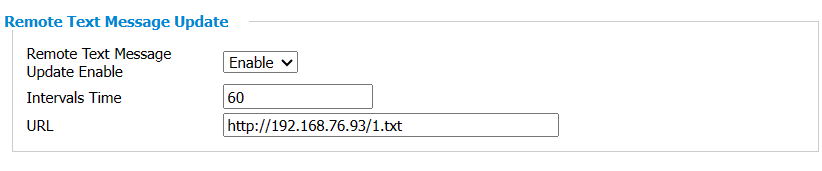
Remote Text Message Update Enable: select Enable or Disable.
Intervals Time(s): the phone requests the txt file from the server according to this time interval.
URL: enter the txt file’s URL, for example: tftp://192.168.50.129/weather.txt. It supports tftp and https protocal.
Txt file format: txt file contains the text prompts, such as weather, temperature and so on.
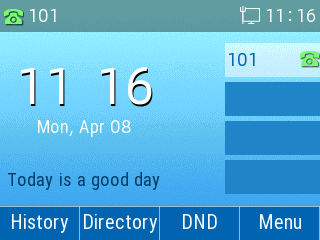
After the settings, click on Save&Apply on the bottom of the page, restart the ip phone with the command(voip.sh restart) or restart the phone manually, the screen will display the text in the txt file.
 Back to list


