

Though there are emerging technologies, fax still remains a necessity because it is more secure to transmit legal documents amongst businesses. However, fax was designed for analog networks and works with phone lines. If you want to continue using your old fax machine, and you want to connect it to your VoIP phone system, the easiest way is to use a FXS VoIP adapter supporting T.38, T.30 protocol to connect them to a VoIP connection.
Connection diagram:

1. Connect the WAN port to the router/switch to access the internet.
2. Connect the FXS port or PHONE port to the fax machine with a telephone line.
3. Connect the LAN port to the computer with an Ethernet cable.
Benefits of fax machine integrated with VoIP:
High Security: VoIP comes with encrypted technology that minimizes the risks of security issues and data loss when you fax.
Lower Costs: Integrating fax with your VoIP, you can send your faxes through your VoIP network, saving on international fax costs.
Great Mobility: With VoIP you can keep your existing fax number when moving your office without any hassle, improving the mobility of the office.
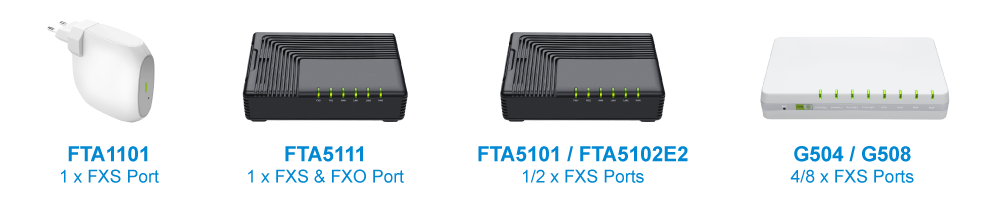
Flyingvoice adapters with FXS ports supporting T.38, T.30:
For more information on using Flyingvoice adapters to work with a fax machine, please visit Flyingvoice Support > FAQ.
If you have any interest or query, please contact our sales team (sales@flyingvoice.com), thanks.


 Back to list
- The Day After POTS Replacement: What Does Good Service Look Like?
- When POTS Goes Away: What Happens to the Legacy Devices Behind the Phone Line?
- The POTS Replacement Checklist: 10 Things Installers Should Verify Before Leaving the Site
- Choosing the Right POTS Replacement Strategy: It's About More Than Just Replacing Copper
- Beyond Connectivity: Why Device Management Is Becoming the Most Valuable Part of POTS Replacement